Parameter Fitting Features
General Process
The Parameter Fitting module has several options for a user to add a capability:
New experimental data classes may be added to the
data_classesdirectory, as shown in Figure 1. Referencing the abstract template class,ExpDataTemplate, will ensure proper integration with DESPASITO. This is recommended once a new thermodynamic calculation type is added to that module. However, the thermodynamic calculation types and the parameter fitting classes are not directly comparable, as some data classes cover multiple thermodynamic calculations. For example, the TLVE.Data class covers temperature dependent vapor liquid equilibria (TLVE) calculations such as the bubble point and dew point calculations.Global minimization algorithms are packaged in wrappers within the
global_methodsmodule. Adding a wrapper for a new method here allows the module to locate a breadth of methods from various sources.Another opportunity for growth at this level would be in the addition of a constraint function to the
constraint_typesmodule. Constraint are optional additions to several supported global optimization algorithms (e.g.differential_evolution()) and so are defined in theglobal_dictinput offit()as a dictionary under the keywordconstraints. The specific type is then picked up with a factory design pattern.Objective functional forms can also be added to
obj_function_form()
The four areas of flexibility in the parameter fitting module are designed to provide convenient access and customization.
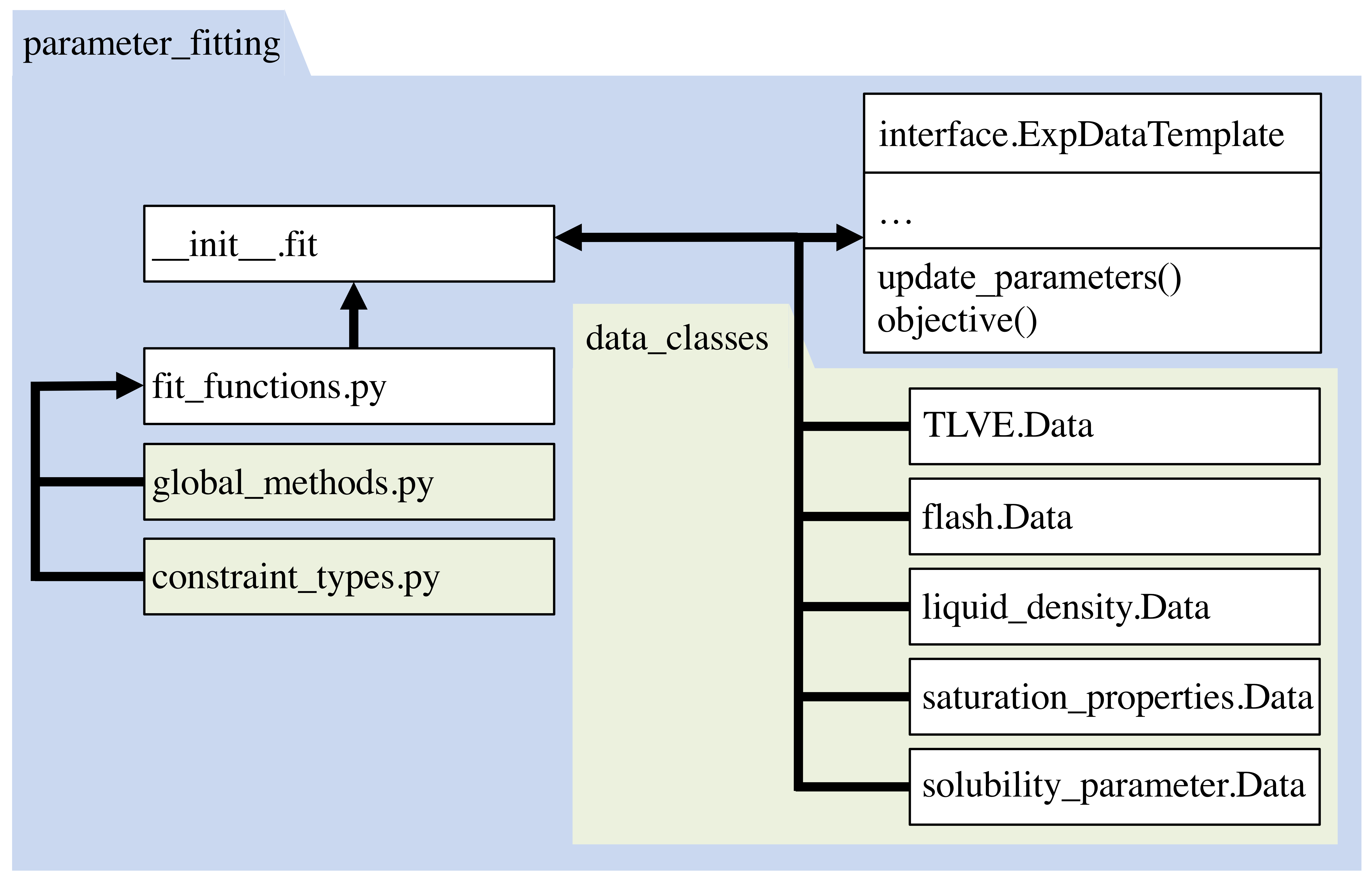
Figure 1: The parameter_fitting module employs the fit() function to handle setting up and dispatching calculations. Any function in the global_methods module or data type class in the directory data_classes can be discovered through a factory pattern. New thermodynamic calculations cannot be used in parameter fitting until a corresponding data class is added.
Experimental Data Class Interface
Adding a class to handle parameter fitting with a new type of experimental data is easily implemented by adding a new module with a meaningful name to represent the data type. Within this module a class called Data will inherit a template class to ensure integration with the other modules.
- class ExpDataTemplate(data_dict)[source]
Interface needed to create further objects to represent experimental data.
- Parameters:
data_dict (dict) – Dictionary of exp data
calculation_type (str) - Optional, default=*to be set*
MultiprocessingObject (obj) - Optional, Initiated
MultiprocessingJob* eos_obj (obj) - Equation of state object * weights (dict) - A dictionary where each key is the header used in the exp. data file. The value associated with a header can be a list as long as the number of data points to multiply by the objective value associated with each point, or a float to multiply the objective value of this data set. * density_opts (dict) - Optional, default={}, Dictionary of options used in calculating pressure vs. mole fraction curves. * Allowed property keys and associated values * kwargs forobj_function_form()- Variables:
name (str) – Data type, name of module, “To be set”
Eos (obj) – Equation of state object
weights (dict, Optional, default: {"some_property": 1.0 ...}) – Dictionary corresponding to thermo_dict, with weighting factor or vector for each system property used in fitting
obj_opts (dict) – Keywords to compute the objective function with
obj_function_form().npoints (int) – Number of sets of system conditions this object computes
thermodict (dict) –
Dictionary of inputs needed for thermodynamic calculations
calculation_type (str) default=*to be set*
density_opts (dict) default={}
- abstract objective()[source]
Float representing objective function of from comparing predictions to experimental data.
- update_parameters(fit_bead, param_names, param_values)[source]
Update a single parameter value during parameter fitting process.
To refresh those parameters that are dependent on to bead_library or cross_library, use method “parameter refresh”.
- Parameters:
fit_bead (str) – Name of bead being fit
param_names (list) – Parameters to be fit. See EOS documentation for supported parameter names. Cross interaction parameter names should be composed of parameter name and the other bead type, separated by an underscore (e.g. epsilon_CO2).
param_values (list) – Value of parameter